
Day 10: The Link to Comment Strategy
You've made it to Day 10 or 33% of the way through the Email Growth Challenge for Nonprofits 🎉 I hope you are so proud of yourself.
Yesterday, we talked all about creating something valuable—something that solves a problem—and people getting it in exchange for giving you and your nonprofit their email address.
But how do you get ✨new✨ people to see your freebie offer?
Today, MacKenzie McClain, my right hand gal, is going to walk you through the “Link to Comment" strategy that generated hundreds of new sign-ups to the Out in the Boons email list.
Here are the steps ⬇️:
🛠️ Setting up your Link to Comment Strategy
Step 1: First, you need something for new subscribers to opt-in to. It could be:
A freebie like we talked about yesterday
A petition
…and a million more things.
The point is you need to provide something people actually want. “Join my newsletter” isn't going to cut it.
Step 2: Once you have your “thing” — you are going to write a social media post (LinkedIn, Instagram, etc) with a captivating hook. It has to be captivating, curiosity inducing, and captures people's attention in less than 2 seconds. I know!
This is the line (+ I think the photo helped too!) that worked for MacKenzie:
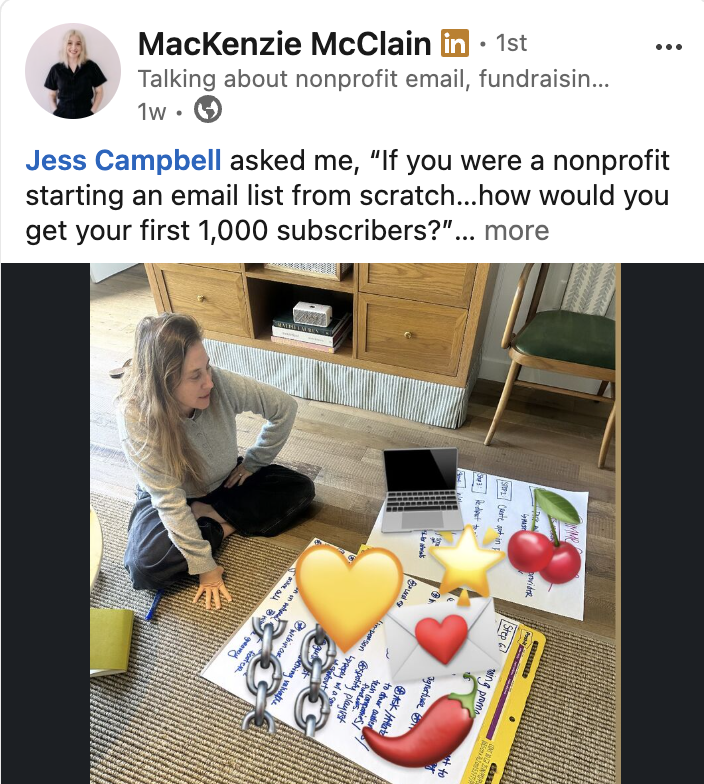
Step 3: Write your post and have a clear call-to-action. When you write your CTA, give people an easy word to write in the comments that will trigger you to send them a DM (this is important), not a link in the comments. LinkedIn doesn't love outside links and may suppress your post if it has a bunch of links.
In this example, MacKenzie told people to use the word “GROW” and she'd DM them the sign up link to this 30 Day Email Growth Challenge.
Step 4: Once someone comments your word, you'll want to DM them a message with the link to your opt-in page. I usually write a short but friendly note like, “Hey, thanks for leaving a comment - here is the XYZ opt-in link you asked for.”
Pro tip #1: LinkedIn only lets you DM second degree+ connections a few times a month so—you might want to encourage people to connect with you first.
Pro tip #2: In your DM, at the end, you might consider writing something like, “Quick favor—can you hit reply and let me know you received this DM?” that way people will reply to your message and LinkedIn won't flag you as a spammer.
Note: There are tools like ManyChat (not affiliated) that work on platforms like Instagram and do this for you automatically (people leave a comment and they get a DM sent to them). Unfortunately, they don't integrate with LinkedIn.
💡 Why it works
The “Link to Comment” strategy works for two reasons:
On a platform like LinkedIn, the algorithm has a spiderweb effect meaning—when your connections engage with your post it will be pushed out to THEIR connections therefore reaching a ton of new eyeballs.
You make opt-in in EASY.
📊 Results
In this example, MacKenzie had 365 people leave a comment “GROW” on her post.
At one point I text her that her post was reaching the exact audience we wanted, in-house nonprofit leaders and fundraisers. 👏

🧰 Tools Needed
Your opt-in page link
A captivating hook
A social media platform
🗣️ Last thought
Least you think, “Oh well, MacKenzie probably has thousands of followers—that's why this worked," I'm here to tell you that's not the case.
MacKenzie is new to LinkedIn with less than 300 followers.
If her post can go this viral, so can yours.
Want to see MacKenzie's post in full? Check in out here.
Be back tomorrow for Day 11!